How to draw a wall elevation
What a wall elevation shows, the usual heights of counters, cabinets, outlets and switches, and how to make one from your floor plan with dimensions, as SVG or PDF.
6 min read · Updated October 21, 2026
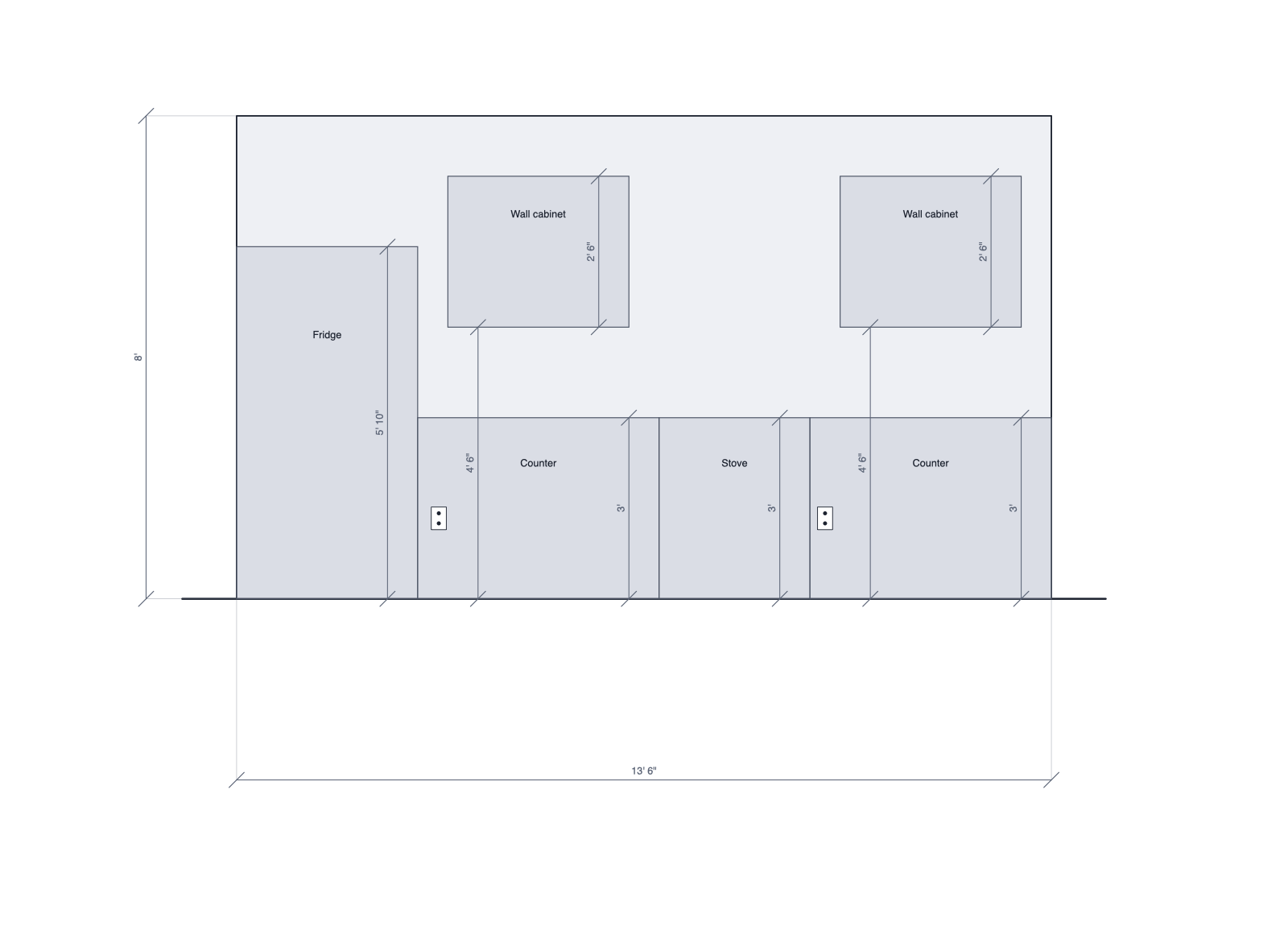
A floor plan shows where things are; an elevation shows how high they are. Looking straight at one wall, you see the window's sill, the counter, the cabinets above it and the outlets in the backsplash, each at its real height and with its dimensions. Kitchen fitters, cabinet makers and electricians work from elevations, and they're the quickest way to check that a window and the cabinets beside it line up.
1. Draw the floor plan to scale
The elevation is built from the plan, so start there: draw the walls at their real lengths and add the doors and windows. The guide to drawing a floor plan to scale walks through it, or start from the kitchen template.
2. Set the heights
Select a wall to set its height; turn on Sloped top for a wall under a roof or an attic, and the elevation shows the slope. Select a window to set its sill (the height of its bottom edge, often 36 to 42 inches, higher over a counter) and its own height, and a door to set its height (usually 80 inches).
3. Place what stands against the wall
Add the counters, appliances, cabinets, shelves and furniture with their backs to the wall. Anything within 6 inches of the wall appears in its elevation. The usual heights:
- Counters and base cabinets: 36 inches high, 24 deep.
- Wall cabinets: starting 54 inches up, 30 to 42 inches tall, 12 deep.
- Outlets: about 16 inches up; above a counter, in the backsplash.
- Light switches: about 48 inches up; thermostats about 60.
4. Open the elevation view
Right-click the wall and choose Elevation view, or select it and press Elevation view in its properties. Each wall has two faces: pick the one you want, named after the room it looks onto, such as Kitchen, north wall, or Outside for the exterior.
5. Check the dimensions
The elevation shows the wall's length (the inside face, between the walls at each end) and height, each opening's width, the sill and head height of each window, and each cabinet's height and how high it hangs. If something's wrong, change it on the plan: the elevation is redrawn from it.
6. Download it or add it to the PDF
Press SVG or PNG to download the elevation. To print it with the plan, turn on Add to PDF exports for each wall, then export a PDF with Add elevations on: each wall gets a page with a title block, at 1/2" = 1' or the largest usual scale that fits. Pricing the job too? The drywall and paint calculators work out the materials for a room.
Draw yours in DrawPlans
Type your measurements and the plan is to scale from the first wall. Furniture at real size, a 3D view, and a PDF that prints at the scale you choose, with a scale bar. You can draw one plan and see it in 3D before paying.
Start drawingTemplates to start from
Questions people ask
- What is a wall elevation?
- A drawing of one wall seen straight on, as if you stood in front of it with no perspective. It shows heights a floor plan can't: where windows start and end, how tall the counters are and how high the cabinets hang. Kitchens, bathrooms and built-ins are usually drawn this way.
- What's the difference between an interior and an exterior elevation?
- An interior elevation shows one wall from inside a room, with its cabinets and fittings. An exterior elevation shows the outside of the house from one side. In DrawPlans you pick the side of the wall: the room it faces, or Outside.
- What are the standard heights for kitchen cabinets?
- Base cabinets and counters are 36 inches high and 24 inches deep. Wall cabinets usually start 54 inches above the floor (18 inches above the counter) and are 30 to 42 inches tall and 12 inches deep.
- What scale are elevations drawn at?
- Usually 1/2 inch = 1 foot, or 1/4 inch = 1 foot for long walls; 1:20 or 1:50 in metric. DrawPlans picks the largest of these that fits the page.